

SteadyPoint HRIS is designed to generate comprehensive reports and analytics, providing you with a clear view of your HR operations. With clear insights, you can track key HR activities and make informed decisions.
In this blog, we'll look at the analytics available in the SteadyPoint HR management system. For a broader feature overview, see top SteadyPoint HR management system features.
Ready to try it yourself? Start your free trial of SteadyPoint HR. For more guides, visit the HR App blog.
Analytics in SteadyPoint HRIS
SteadyPoint HRIS provides three types of analytics: General Statistics, Employee Statistics, and Recent Activity.
Type 1: General Statistics

This section provides a summary of the company's HR activities, including:
- Total number of employees added to the system
- Pending leave requests that require approval
- Active onboarding processes
- Active offboarding processes
- Active policies
Type 2: Employee Statistics
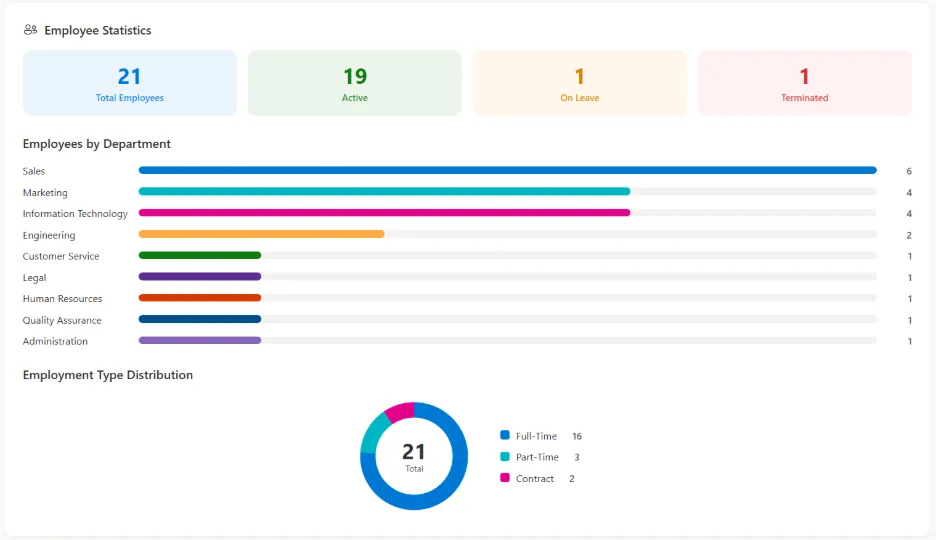
The Employee Statistics section gives you a clear view of your workforce, including:
- Total number of employees by department
- Total number of employees by employment type (such as full-time, part-time, and other employment types)
Type 3: Recent Activity
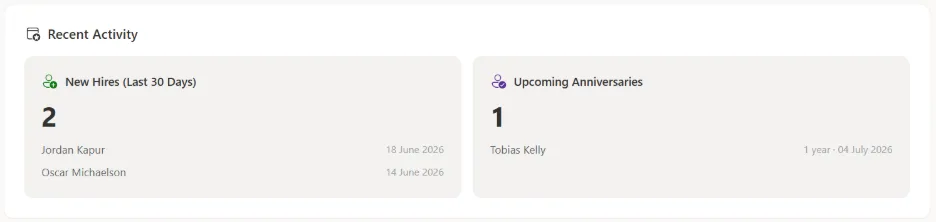
This section displays the most recent HR updates, including:
- New hires employed in the last 30 days
- Upcoming employee anniversaries