
If your organization already uses Microsoft 365, you may not need a separate platform to create an HR portal. SharePoint Online can provide a central place for HR information, employee resources, documents, requests, and everyday HR processes.
A well-designed SharePoint HR portal can help employees find what they need without relying on emails or shared folders. HR teams can also use SharePoint lists, document libraries, and Power Automate to manage processes such as leave requests and employee onboarding.
However, building an HR portal is about more than creating a few pages. HR information can be sensitive, so permissions, access control, and security should be part of the plan from the beginning.
This guide explains how to build a secure HR portal in SharePoint Online and what to consider before deciding whether to build one from scratch or use ready-made SharePoint HR software.
What Is a SharePoint HR Portal?
A SharePoint HR portal brings employee information, HR resources, and everyday HR tasks into one online workspace. Employees can use it to find policies, submit requests, access important documents, and complete HR-related tasks, while HR teams can manage information and processes from a central location.
The portal can be tailored to the way your organization manages HR. Common features include employee directories, policy management, leave requests, onboarding and offboarding, HR forms, announcements, training resources, and approval workflows.
Since SharePoint is part of Microsoft 365, an HR portal can also work with Microsoft Teams and Power Automate. This allows organizations to automate routine HR processes, send notifications, and route requests for approval.
For businesses looking for a SharePoint HRIS or SharePoint HR management system, a SharePoint-based portal offers a flexible way to organize HR processes while keeping employees within the Microsoft 365 environment.
What Should a SharePoint HR Portal Include?
A SharePoint HR portal should give employees and HR teams one place to access information and manage common HR tasks.
Employee Information
Store basic employee details such as names, departments, roles, and managers. Keep sensitive records restricted to authorized users.
HR Documents
Organize policies, handbooks, benefits information, forms, and training materials in SharePoint pages and document libraries.
Employee Requests
Manage leave requests, HR inquiries, information updates, and other requests using SharePoint Lists instead of email.
Onboarding and Offboarding
Track tasks, documents, and approvals. Power Automate can automate assignments, notifications, and status updates.
How to Build an HR Portal in SharePoint Online
Once you know what your HR team and employees need, you can start building your SharePoint HR portal.
1. Plan Your HR Portal
Define your users, content, and HR processes. Typical users include employees, managers, HR staff, and administrators.
Decide which information should be available to everyone and which HR data needs restricted access.
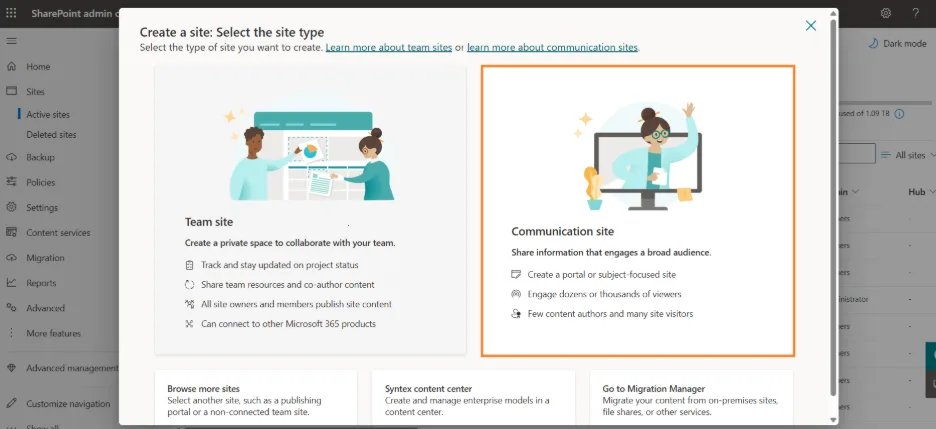
2. Create a SharePoint HR Site
Create a SharePoint site for your HR content and give it a clear structure.
For an employee-facing portal, a Communication Site can be a good starting point.
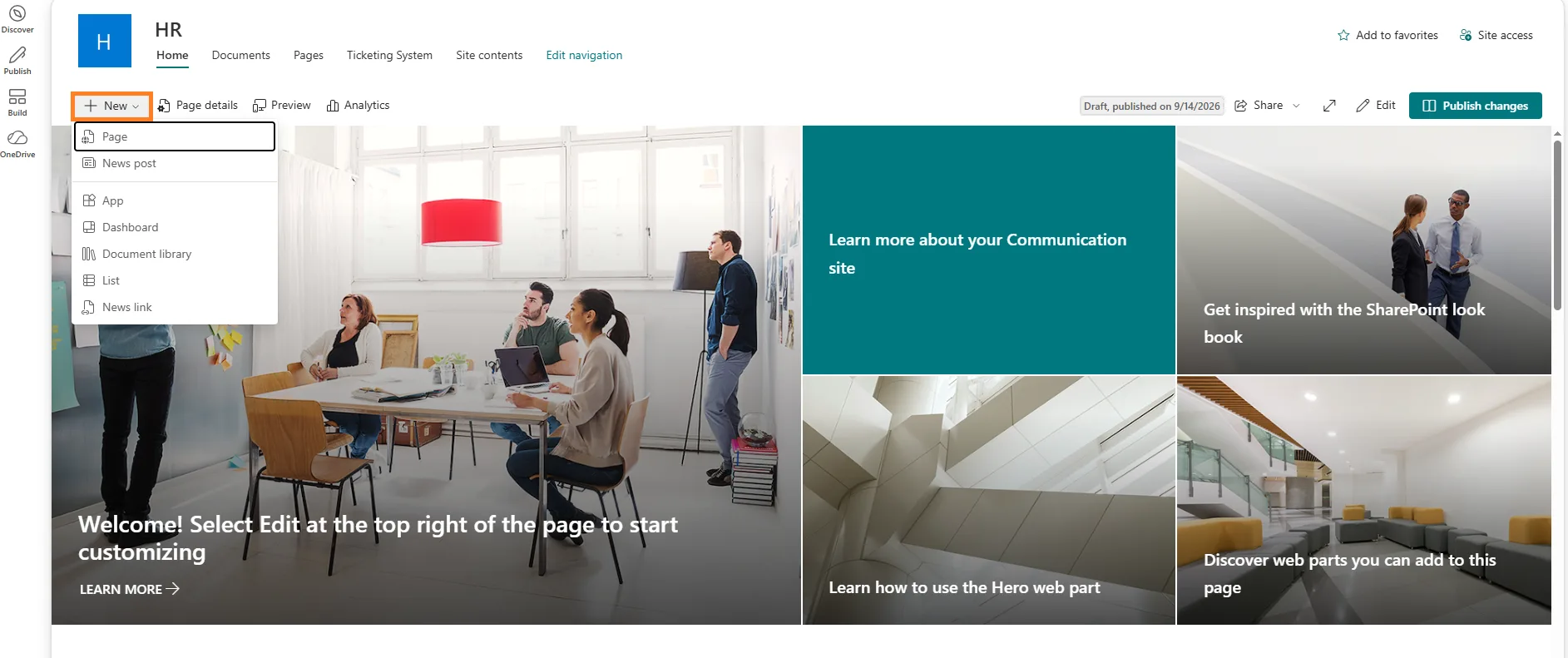
3. Add Pages, Lists, and Libraries
Use SharePoint components based on the type of information you need:
- Pages: HR information, benefits, and announcements
- Lists: Employee records, leave requests, and HR requests
- Libraries: Policies, forms, handbooks, and other documents
This creates the foundation of your SharePoint HR software.
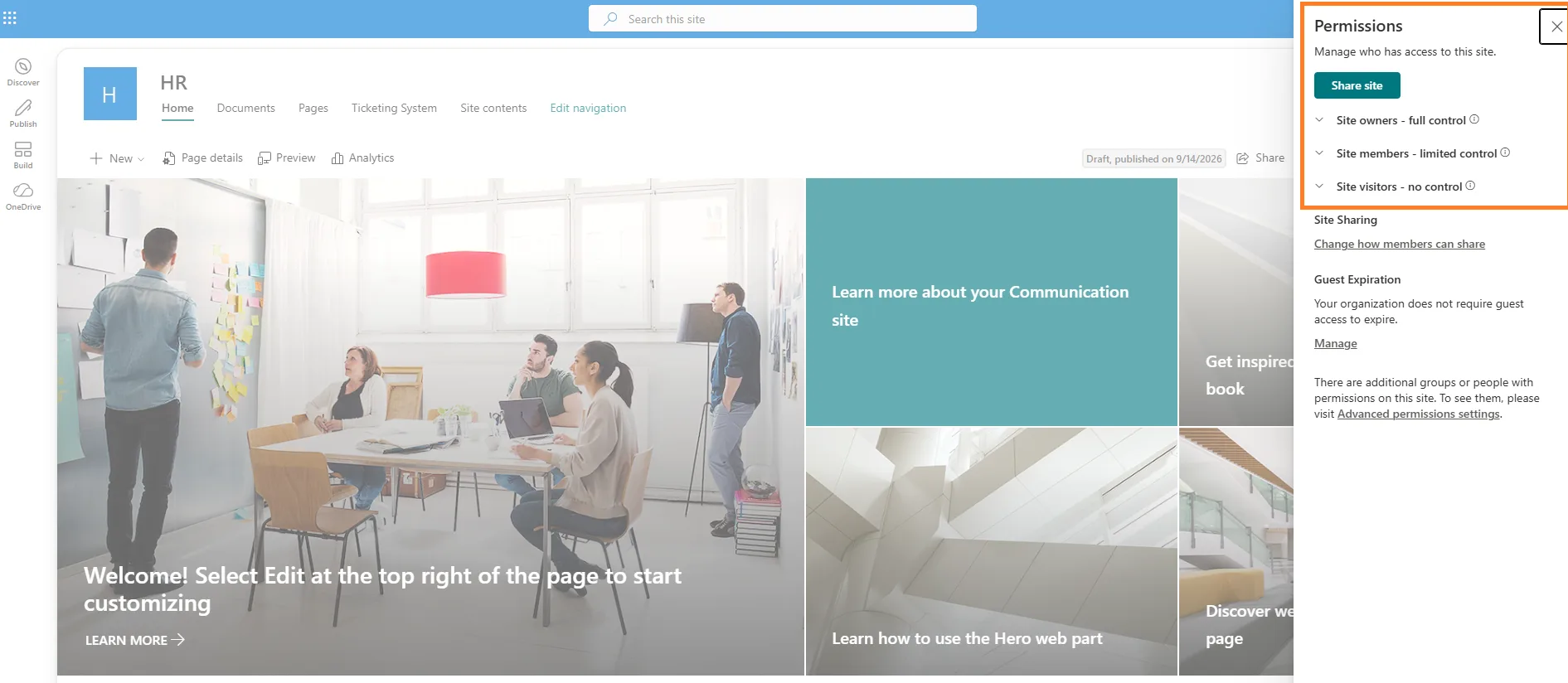
4. Configure HR Permissions
Set permissions based on user roles. Employees may need access to general HR resources, while managers and HR staff may need additional access.
Keep confidential employee information restricted and review permissions regularly.
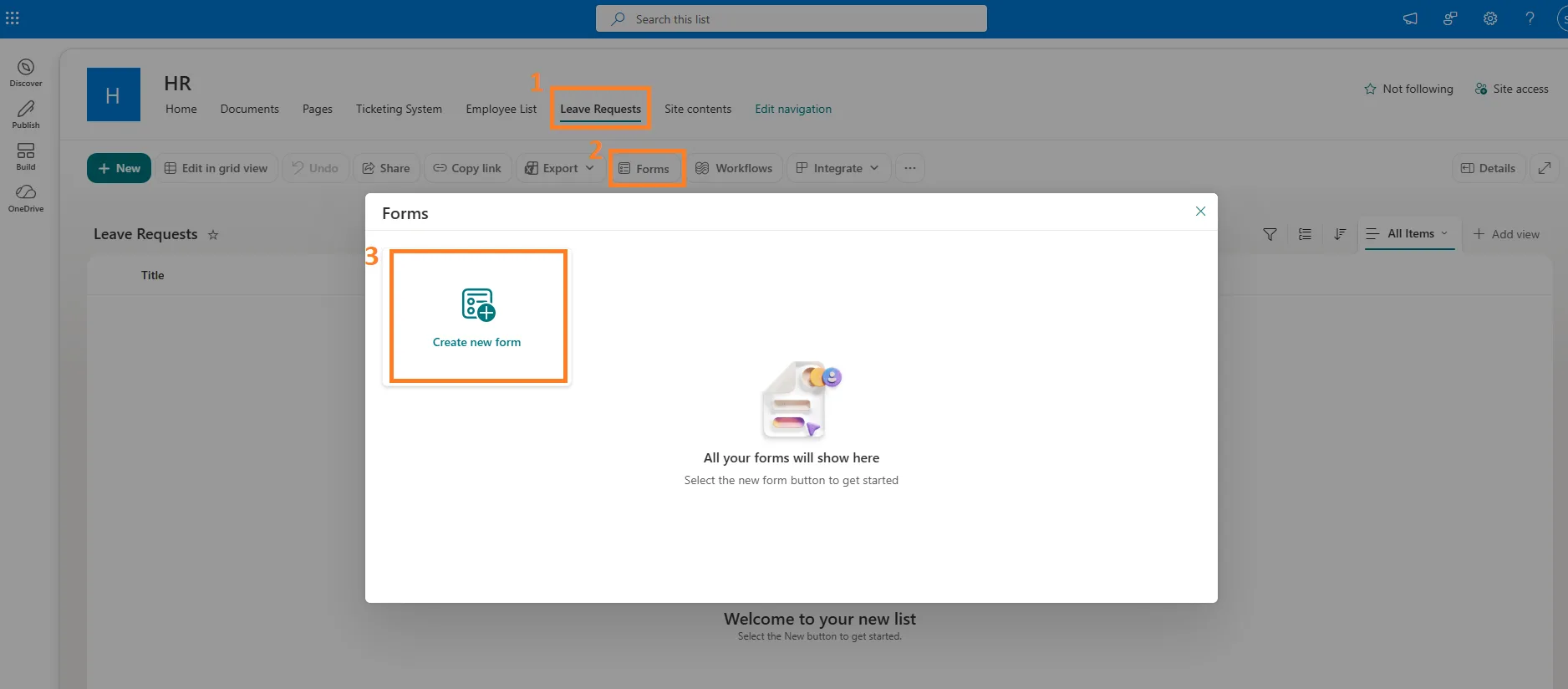
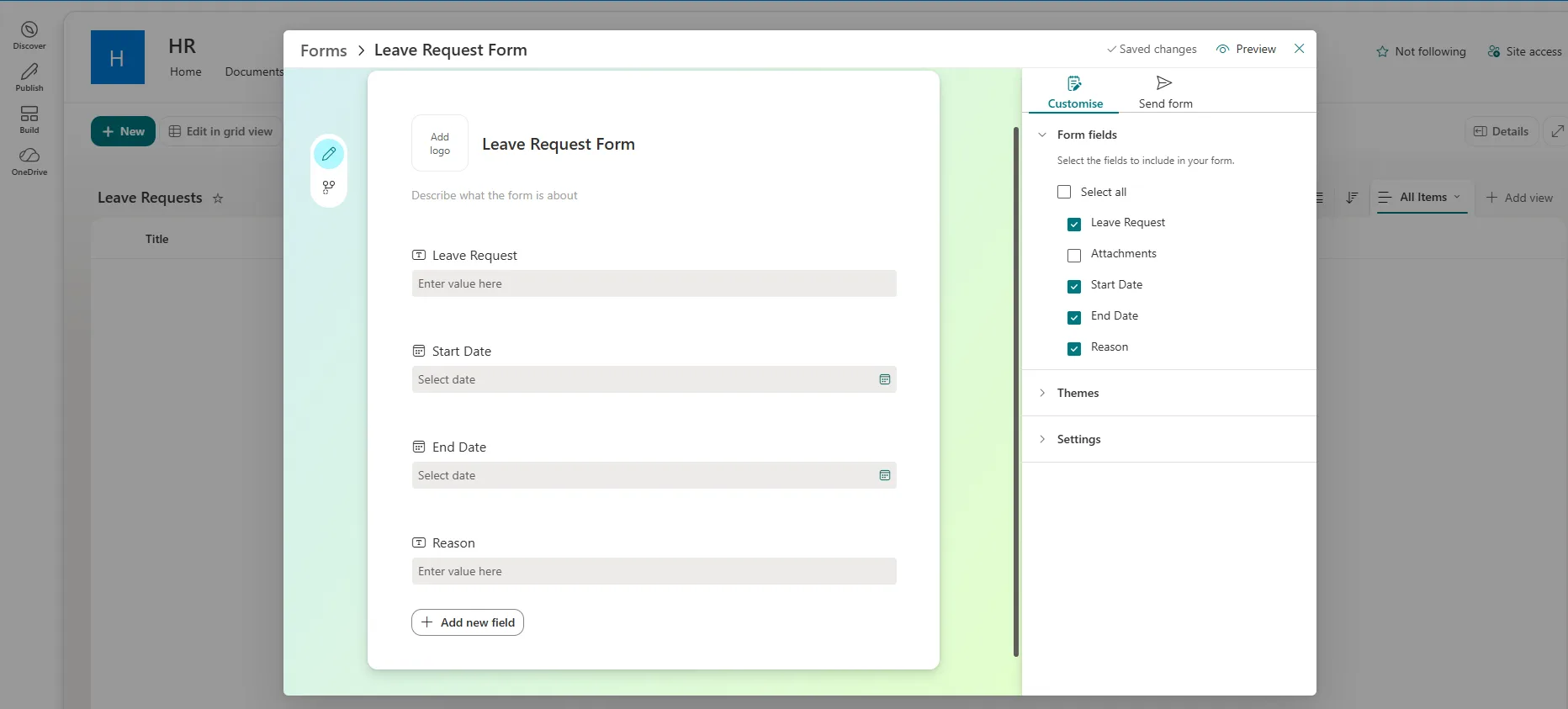
5. Add HR Forms and Requests
Create simple ways for employees to submit leave requests, HR inquiries, information updates, and other requests.
SharePoint Lists can capture requests and track their status.
6. Automate HR Workflows
Use Power Automate to automate approvals, notifications, and repetitive HR tasks.
For example:
Employee submits leave request → Manager approves → Employee receives an update
You can use similar workflows for onboarding and other HR processes, turning SharePoint into a more complete Microsoft 365 HR management system.
7. Test Before Launch
Test the portal with different user roles to make sure employees can only access the information they should see.
Check both security and usability before making the portal available to everyone.
How to Keep a SharePoint HR Portal Secure
HR data is sensitive, so security should be part of your SharePoint HR portal from the start.
- Set role-based permissions: Give employees, managers, HR staff, and administrators only the access they need.
- Protect sensitive data: Keep confidential employee records separate from general HR resources.
- Use Microsoft 365 security: Take advantage of features such as Microsoft Entra ID, MFA, Microsoft Purview, and DLP where appropriate.
- Test access: Check the portal with different user roles before launch to make sure sensitive information is properly restricted.
- Review permissions regularly: Update access when employees join, leave, or change roles.
A secure Microsoft 365 HR management system is not just about setting permissions once. Regular reviews and testing help keep HR information protected as your organization changes.
SharePoint HR Software vs. a Traditional HRIS
Building an HR portal directly in SharePoint can be a good option for organizations that already use Microsoft 365 and have the internal resources to configure and maintain it.
However, building every HR process yourself takes time. This is where ready-made SharePoint HR software can be useful.
| Feature / Capability | SharePoint HR Software | Traditional Standalone HRIS |
|---|---|---|
| Data Residency | Data remains within your Microsoft 365 tenant | Data is typically hosted in the vendor's cloud |
| User Authentication | Native Microsoft 365 SSO and Entra ID with MFA | May use separate credentials or external login |
| Teams Integration | Native Microsoft Teams workspace and Adaptive Cards | Often relies on email or webhook notifications |
| Security Governance | Works with Microsoft 365 security and governance capabilities, including Purview and DLP when configured | Security and governance are primarily managed by the vendor |
| Microsoft 365 Integration | Works within the existing SharePoint and Microsoft 365 ecosystem | May require additional integrations or connectors |
For organizations already invested in Microsoft 365, using a native solution can reduce the need to introduce another platform for HR management.
Should You Build an HR Portal From Scratch or Use SharePoint HR Software?
There is no single answer for every organization.
Building from scratch can make sense if you have SharePoint expertise, simple HR requirements, and the time to build and maintain your own lists, permissions, and workflows.
A ready-made Office 365 HR app may be a better fit if you need common HR processes without developing each one yourself.
Consider a ready-made solution if you need features such as:
- Employee records
- Onboarding and offboarding
- Leave management
- Policy acknowledgments
- HR workflows
- Employee self-service
- HR dashboards and reports
- Role-based access
The important question is not only whether SharePoint can support your HR requirements, but how much time and effort you want to spend building and maintaining those requirements.
SteadyPoint HR: SharePoint HR Software Built for Microsoft 365
Building an HR portal in SharePoint gives you a lot of flexibility, but setting up every HR process yourself can take time. SteadyPoint HR gives you a ready-to-use option within Microsoft 365.
With SteadyPoint HR, you can:
- Keep employee records in one place
- Manage onboarding and offboarding
- Handle leave requests
- Share HR policies and track acknowledgments
- Automate HR tasks and approvals
- Give employees easy access to HR services
- Use HR tools through SharePoint and Microsoft Teams
If you are looking for SharePoint HR software or an Office 365 HR app, SteadyPoint HR helps you manage everyday HR processes within the Microsoft 365 environment your organization already uses.
See SteadyPoint HR in Action
Want to see how HR processes can work within your Microsoft 365 environment? Book a demo to explore SteadyPoint HR and see how it can support your team.
Frequently Asked Questions
Can SharePoint be used as an HR portal?
Yes. SharePoint Online can be used to create a SharePoint HR portal for employee resources, policies, documents, requests, workflows, and other HR processes.
How do I create an HR portal in SharePoint Online?
Start by planning your HR content and user roles. Then create the SharePoint site, add pages, lists, and document libraries, configure permissions, add employee requests, and automate processes with Power Automate.
Is a SharePoint HR portal secure enough for HR information?
SharePoint provides Microsoft 365 security and access-control features, but a secure SharePoint HR portal also depends on how permissions, sharing, and sensitive information are configured and managed.
Can SharePoint automate HR processes?
Yes. SharePoint can work with Power Automate to automate processes such as leave approvals, onboarding tasks, notifications, and employee requests.
Can employees access a SharePoint HR portal through Microsoft Teams?
Yes. SharePoint pages and HR resources can be made available through Microsoft Teams, allowing employees to access HR information within their existing Microsoft 365 workspace.
What is SharePoint HR software?
SharePoint HR software uses SharePoint and other Microsoft 365 tools to support everyday HR processes such as employee records, leave management, onboarding, policies, and employee requests.
What is the difference between SharePoint HR software and a traditional HRIS?
SharePoint HR software works within the Microsoft 365 environment, while a traditional HRIS is generally a separate HR platform. For Microsoft 365 organizations, it can bring HR processes closer to the tools employees already use.
Can SharePoint be used as an Office 365 HR app?
Yes. SharePoint can serve as an Office 365 HR app when combined with tools such as Power Automate and Microsoft Teams to manage HR information, requests, documents, and workflows.