

A knowledge base is a collection of documentation/resolutions that often contains answers to frequently asked questions, how-to manuals, and troubleshooting instructions. Its goal is to make it simple for individuals to find solutions without having to seek assistance.
Ready to try it yourself? 👉 Start your free trial of SteadyPoint Helpdesk and create your first ticket today!
Accessing the Knowledge Base in SteadyPoint SharePoint Service Desk App
- Click on the Knowledge Base icon.
Adding new entries to the Knowledge Base
- Go to Knowledge Base
- Click on Add to Knowledge Base
- Fill in the fields
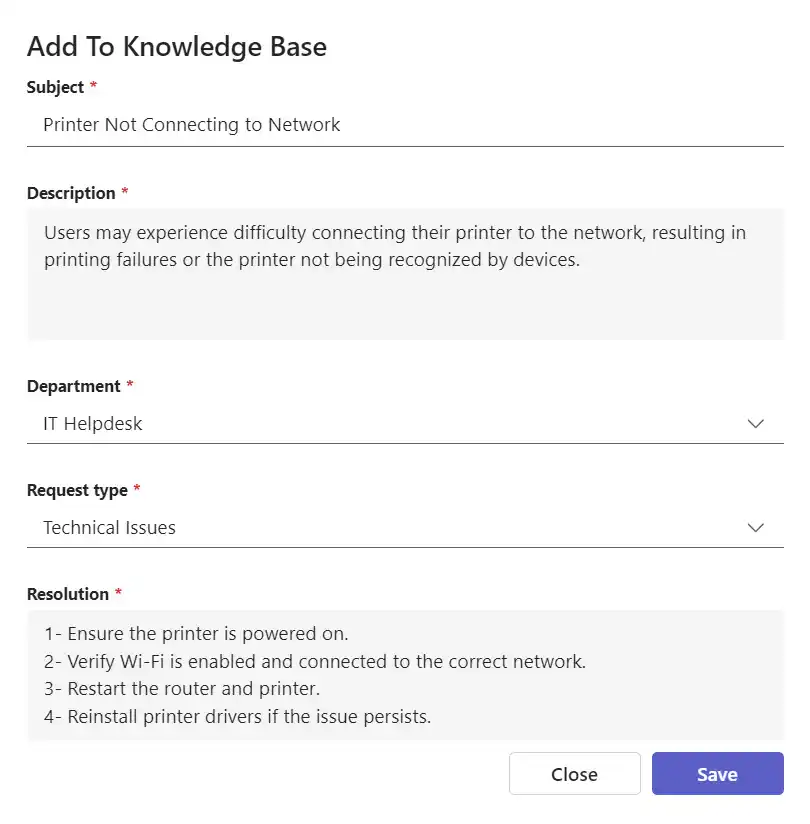
- Subject: Input the Subject/title of the issue.
- Description: Input the details of the issue.
- Department: Select which Department you are connecting the knowledge with.
- Request Type: Select which Request Type you are connecting the knowledge with.
- Resolution: Input the resolution to the issue and how to fix it.
- Attachments.
Who Can See Knowledge Base in SteadyPoint SharePoint Helpdesk?
By default, everyone with helpdesk access can view all knowledge base items. However, admins can control visibility by clicking "Who can see Knowledge Base". To restrict access to specific users, select "Custom" and type in their names. Only the selected users will have access to that section.
- Click on Who can see knowledge base
- Select Custom Users